
Una with Hospitable
Connect Hospitable, check the Airbnb co-host, choose which properties Una handles, and take conversations over.
On this page
With Hospitable connected, one Una agent does two jobs:
-
Inbox replies: Una answers guests in your Hospitable inbox, in conversations from Airbnb, Booking.com and your other connected channels
-
Booking: Una helps new guests book on your website, by phone, on WhatsApp and on your other direct channels
The Polydom team adds Hospitable to your agent first. Until then, your agent has no PMS Settings item. Share your house manuals, check-in instructions and parking notes with the team too. Una's answers are more complete from day one.
Connect Hospitable
-
Open the General tab
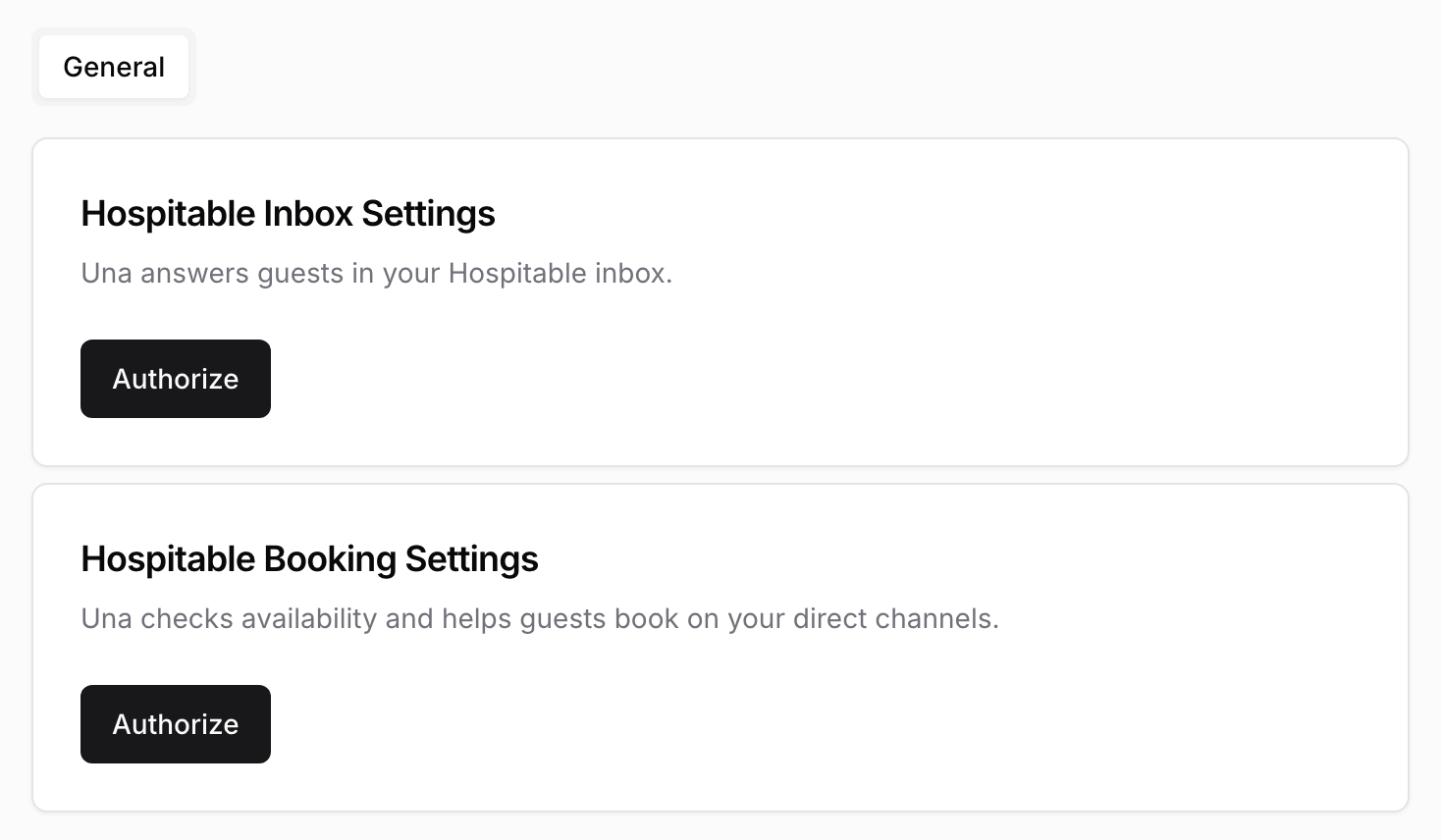
Select your agent in the sidebar and click PMS Settings. The General tab shows two cards, Hospitable Inbox Settings and Hospitable Booking Settings.
-
Authorize the first card
In Hospitable Inbox Settings, click Authorize, sign in to Hospitable and approve access. You return to PMS Settings.
-
Authorize the second card
In Hospitable Booking Settings, click Authorize and approve access again. Each job has its own authorization, so you do this twice. Both cards now show Clear authorization.
-
Check the Airbnb co-host
After you authorize, Hospitable Inbox Settings shows the co-host Una replies under on Airbnb. See Check the Airbnb Co-host. If you have no Airbnb listings, skip this step.
-
Choose your properties in Hospitable
Add the tag
unato each property Una should handle. See Choose Which Properties Una Handles.
If your agent does only one of the jobs, you see one card. Authorize that one.
Check the Airbnb Co-host
On Airbnb, Una's replies go out under one of the co-hosts on your listings. When one co-host is on most of your Airbnb listings, Una picks it after you authorize. The Hospitable Inbox Settings card shows the co-host, Selected automatically and how many listings it covers.
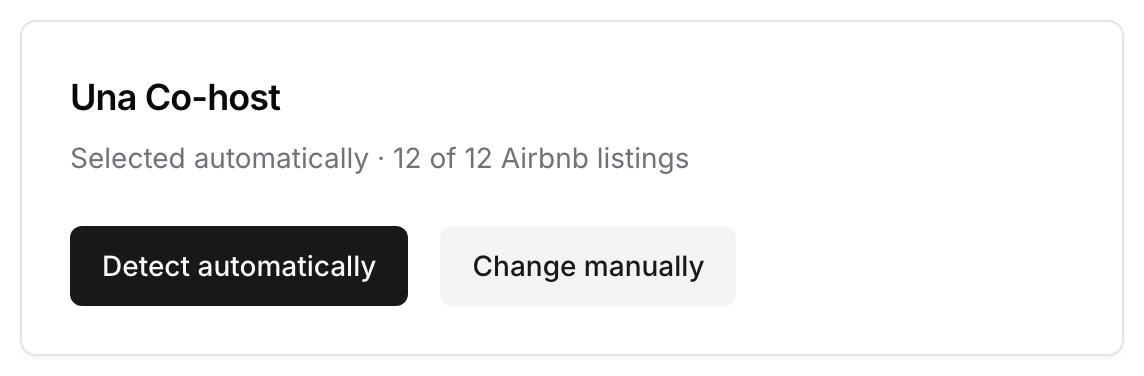
To choose a different co-host:
-
Click Change manually
-
Open Select a co-host. Each option shows how many of your Airbnb listings it covers
-
Select the co-host. Save appears. Click it
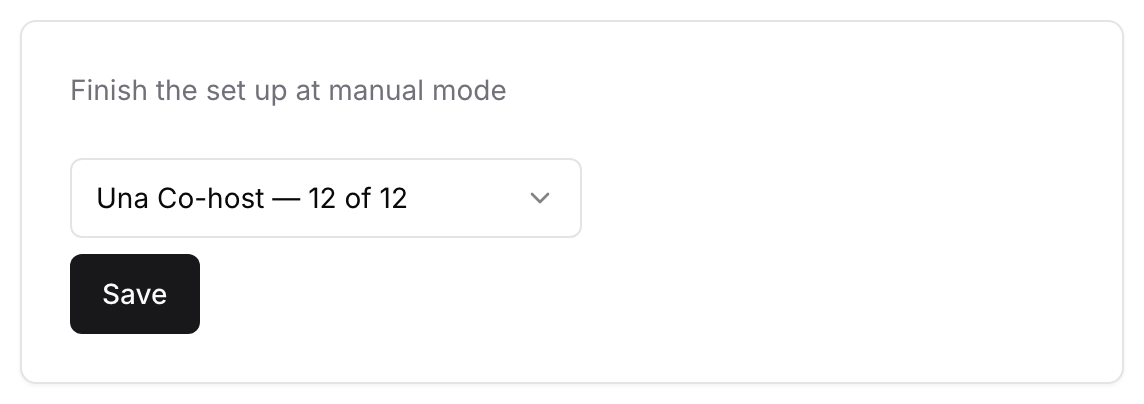
To go back to the automatic choice, click Detect automatically. The Update co-host button above doesn't change the co-host, so use Change manually.
If the card shows Load co-hosts, no co-host was picked. Click Detect automatically. If Una still can't pick one, click Load co-hosts, select one and click Save. If the list shows No hosts found, contact the Polydom team.
Choose Which Properties Una Handles
Una replies only for properties with the tag una in Hospitable.
-
In Hospitable, go to Properties, click the property's name and click Details
-
Click Add tag at the top of the page
-
Type
unaand click Add
Without the tag, Una doesn't reply, and new messages from that property don't appear in your dashboard. Removing the tag stops Una for all conversations of that property, including current guests. To step in for one guest, take the conversation over instead.
Take a Conversation Over
-
Open the reservation in Hospitable
-
Add
[una off]anywhere in the reservation's note and save it -
Reply to the guest yourself
To hand it back, remove [una off] from the note. Una replies from the guest's next message.
You can't stop Una for one inquiry. To stop Una, remove the una tag from the property. This stops Una for all its guests.
Replying without the note does not stop Una. See How Una Replies in Your PMS Inbox.
What Una Reads from Hospitable
Una reads reservations and properties directly, including house rules, the house manual and WiFi details. Keep them up to date in Hospitable.
Booking on Direct Channels
On your direct channels, Una offers only what's available in Hospitable, at Hospitable's price, and sends a booking link when the guest is ready. In inbox conversations Una doesn't book new stays.
Each link is listed under Reservation Offers in the sidebar. See Viewing Reservations and Reservation Offers.
Disconnecting
In the card on the General tab, click Clear authorization. Una stops that job until you click Authorize again. Clearing Hospitable Inbox Settings also removes the selected co-host. It is detected again when you authorize.
Troubleshooting
-
No PMS Settings item: the Polydom team has not added Hospitable to this agent yet.
-
Una doesn't reply for a property: check that it has the
unatag and that the reservation note doesn't contain[una off]. -
Una replies on Airbnb under the wrong name: choose the right co-host with Change manually.