
Una with Mews
Connect Mews, choose what Una sells, and see how guests finish the booking on your Mews Booking Engine.
On this page
With Mews connected, Una sells your rooms on your website, by phone, on WhatsApp and on your other direct channels. Una offers only what's available in Mews for the guest's dates, then sends a link to your Mews Booking Engine with the room, dates and guests filled in. The guest chooses the rate and finishes the booking there.
This guide covers setups using Mews Booking Engine. If your hotel uses another booking engine, ask the Polydom team which setup applies.
Connect Mews
-
Install Una (you)
Open Una by Polydom in the Mews Marketplace and click Start integration, or contact the Polydom team. There is no Authorize button for Mews.
-
Connect Mews (Polydom team)
The team connects Mews to your agent, selects your accommodation service and links your Booking Engine. Then they send you a link to your dashboard.
-
Check the service (you)
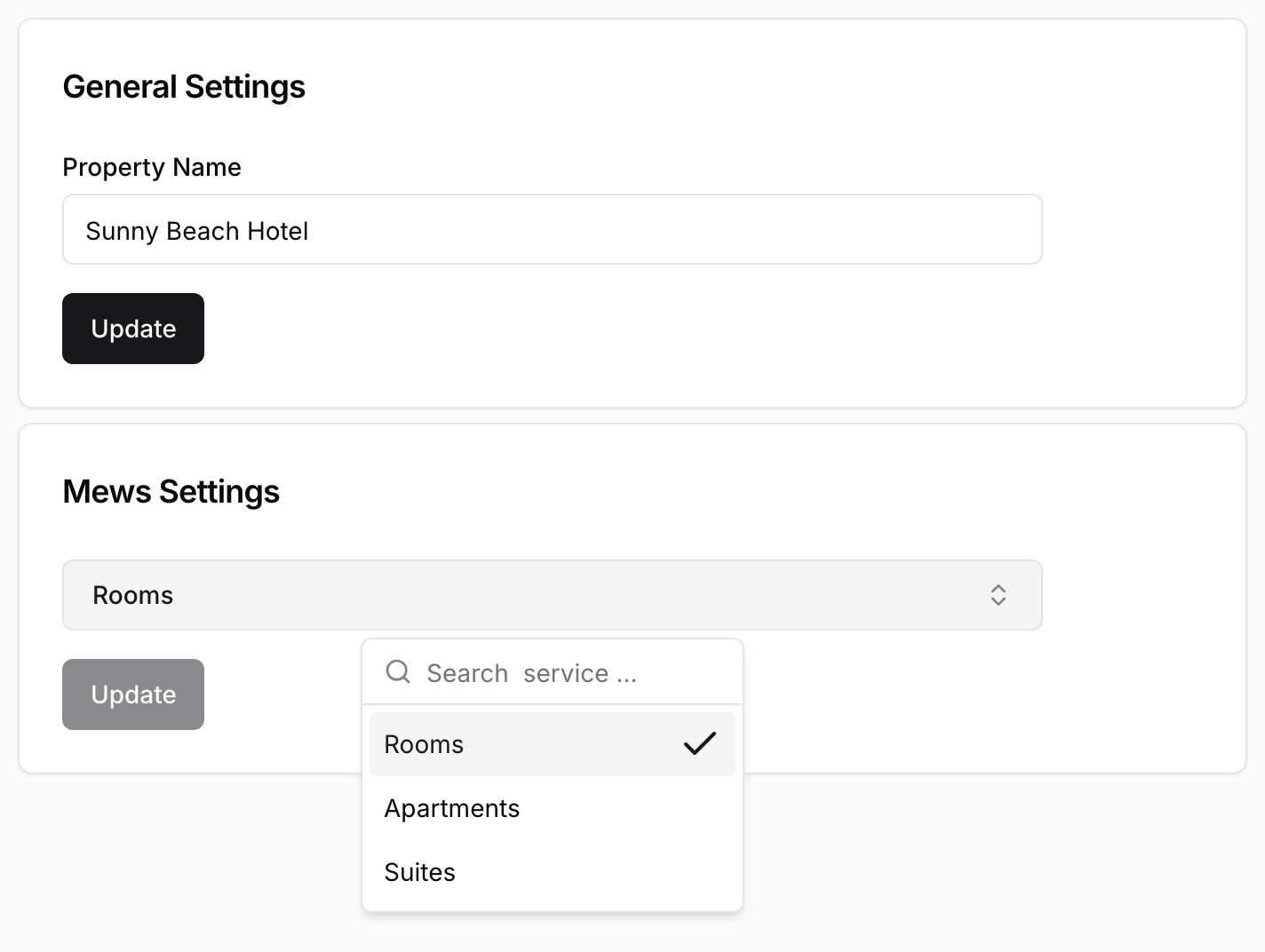
Open PMS Settings in the sidebar and go to General. In the Mews Settings card, check that the dropdown shows the service Una should book. To change it, select another one and click Update.
-
Check the property name (you)
In the General Settings card, Property Name is the hotel name in the WhatsApp message with the booking link that Una sends during a phone call. Change it if needed and click Update.
-
Choose what Una sells (you)
Click Sync Manager, switch on the rate plans Una should sell and click Sync. Then add descriptions and photos. See Room Types and Rate Plans.
After Una Sends the Link
Una doesn't create the reservation and can't hold a room. The booking exists only once the guest completes it on the Booking Engine.
During a phone call, Una sends the link by SMS or WhatsApp if your agent has them. Ask the Polydom team to set this up.
Each link Una creates is listed under Reservation Offers in the sidebar. A link appears as soon as Una creates it, whether or not the guest books. To see who booked, check Mews. See Viewing Reservations and Reservation Offers.
What Still Needs Your Team
Una can't look up, change or cancel Mews reservations. These go to your team:
-
questions about existing reservations, changes and cancellations
-
refunds, compensation and billing disputes
-
complaints and anything that needs judgement
Troubleshooting
-
No Sync Manager button, or the list of rate plans is empty: check that the selected service has active rates in Mews. If it does, contact the Polydom team.
-
The Mews Settings dropdown is empty: the connection is not finished, or has stopped working. Contact the Polydom team.
-
Una offers the wrong rooms: check that the right service is selected and saved with Update.
-
Una never offers a rate plan: check that it is switched on in Sync Manager and bookable for those dates in Mews.
-
The link opens the Booking Engine without the room or dates: contact the Polydom team to check which Booking Engine is linked.