
Una with Zeevou
Connect Zeevou, keep conversations in Inbox for Una, take them over with folders, and store property information where Una can use it at the right time.
On this page
With Zeevou connected, one Una agent does two jobs:
-
Inbox replies: Una answers guests in Zeevou Inbox, in conversations from Airbnb, Booking.com and your other connected channels
-
Booking: Una helps new guests book on your website, by phone, on WhatsApp and on your other direct channels
The Polydom team adds Zeevou to your agent and prepares the connection to your Zeevou account. Wait until they tell you the agent is ready: before that, Authorize doesn't work. Share your house manuals, check-in instructions and parking notes with the team too. Una's answers are more complete from day one.
Connect Zeevou
-
Open the General tab
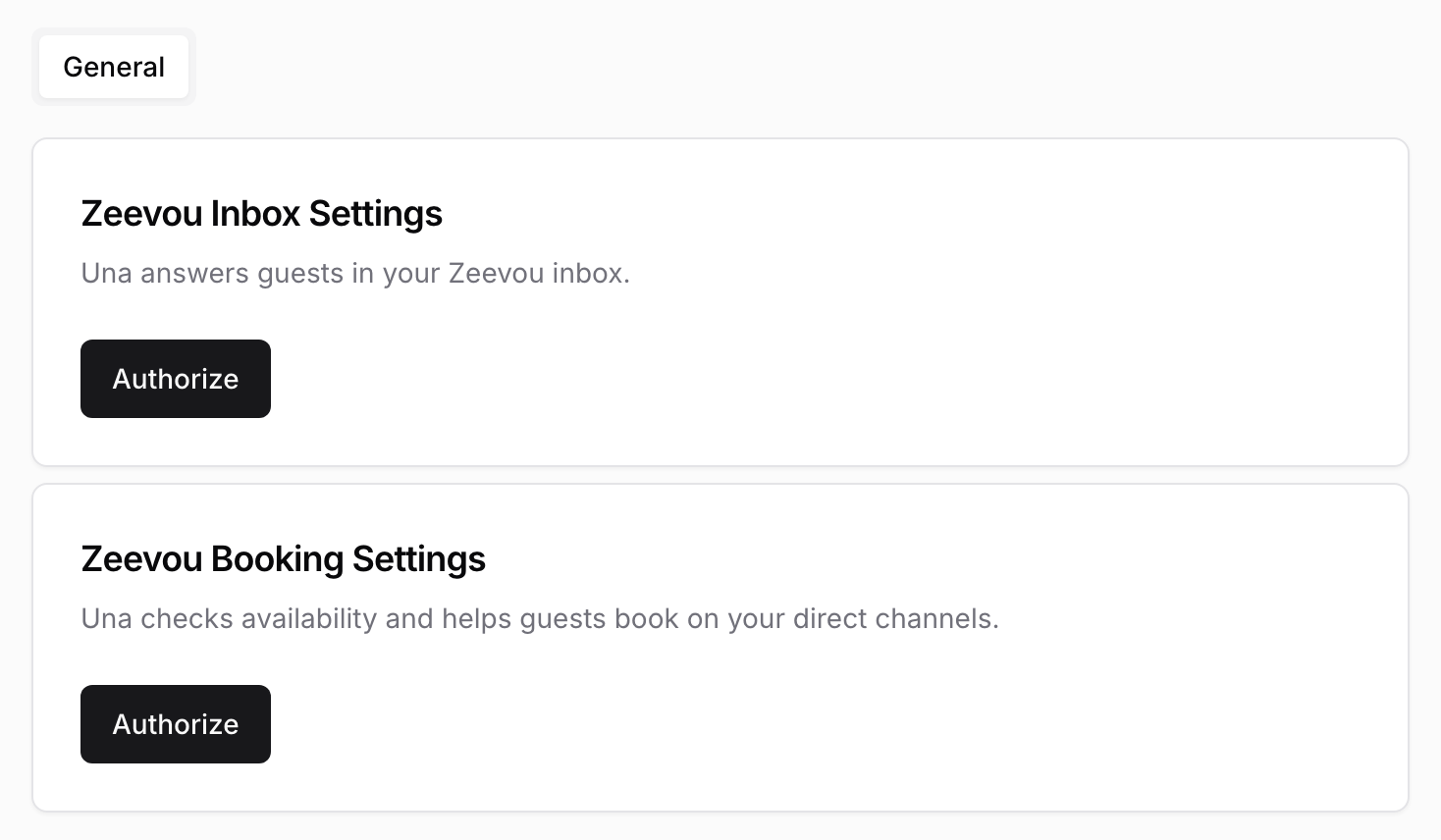
Select your agent in the sidebar and click PMS Settings. The General tab shows two cards, Zeevou Inbox Settings and Zeevou Booking Settings.
-
Authorize the first card
In Zeevou Inbox Settings, click Authorize, sign in to Zeevou and approve access. You return to PMS Settings.
-
Authorize the second card
In Zeevou Booking Settings, click Authorize and approve access again. Each job has its own authorization, so you do this twice. Both cards now show Clear authorization.
If your agent does only one of the jobs, you see one card. Authorize that one.
To disconnect, click Clear authorization in the card. Una stops that job until you click Authorize again.
Take a Conversation Over
Una replies only while a conversation is in the Inbox folder in Zeevou. Una answers every Inbox conversation of the connected account. There is no switch per property.
-
To handle a conversation yourself: move it to another folder. If you don't have one yet, create one in Zeevou. Any name works, for example "With manager". Una stops replying there, and your team can reply as usual.
-
To hand it back: move it back to Inbox. Una replies from the guest's next message.
Una doesn't see what was written while the conversation was in another folder, and those messages don't appear in your dashboard. If the guest's next question depends on what you agreed there, keep the conversation in your folder until it is settled.
Replying in an Inbox conversation does not stop Una. See How Una Replies in Your PMS Inbox.
Where to Store Property Information
Una reads what is already in Zeevou, such as check-in time, guest instructions and address. Three fields let you decide when Una may share each detail:
| Field | Where | When Una uses it | Use it for |
|---|---|---|---|
| Reservation FAQs: After Booking | Listing, Instructions tab | In every conversation, even before booking. Keep it free of sensitive details | House rules, transport and area information, pre-arrival information |
| Reservation FAQs: After Check-in Ready | Listing, Instructions tab | Only once the booking is ready for check-in | Keybox location, parking instructions, WiFi details, check-out procedure |
| Other Amenity | Listing, in the House Manual section of the Instructions tab | Only once the booking is ready for check-in | Short unit details, such as bin collection or appliance quirks |
When Una Shares Access Details
Una shares access details only when all three are true: the booking is ready for check-in, it is active, and it has a unit assigned. Access details are access codes, key safe locations, WiFi details and check-in instructions.
If steps are missing, Una tells the guest and points to the link Zeevou provides. If a guest says they have already completed them, Una passes this to your team and still doesn't share the details.
Stay Extensions
To extend a stay in Zeevou, Una checks the new check-out date, calculates the extra nights, creates the extension and shares the link Zeevou provides for the next step. Una passes the request to your team when the extension isn't possible, the number of guests changes or it needs approval. The Polydom team can tell you which rules apply to your agent.
Booking on Direct Channels
On your direct channels, Una asks for the dates and number of guests, offers only what's available in Zeevou, at Zeevou's price, and sends a booking link when the guest is ready. Long stays, corporate requests and unusual cases may go to your team.
Each link is listed under Reservation Offers in the sidebar. See Viewing Reservations and Reservation Offers.
Troubleshooting
-
Una doesn't reply to a guest: check that the conversation is in Inbox.
-
Authorize does nothing or shows an error: the Polydom team may not have finished preparing the agent. Contact them.
-
Una doesn't share the access code: check that the booking is ready for check-in, is active and has a unit assigned.